
Xiaomi-OCR-0: How Xiaomi Trained Qwen into a 0.8B Document Specialist
Xiaomi-OCR-0 is a compact option for turning document images into structured content. One 0.8B vision-language model handles page parsing, key information extraction and questions about text in images.
The interesting part is how it got there: Xiaomi started with Qwen3.5-0.8B-Base and trained on roughly 170 million OCR-focused samples. Think of it as training a generalist intern for a document-processing job. Good teaching material comes first, followed by locating text, broad practice and harder exercises with checkable feedback. The official model card describes the recipe and reports the results below.
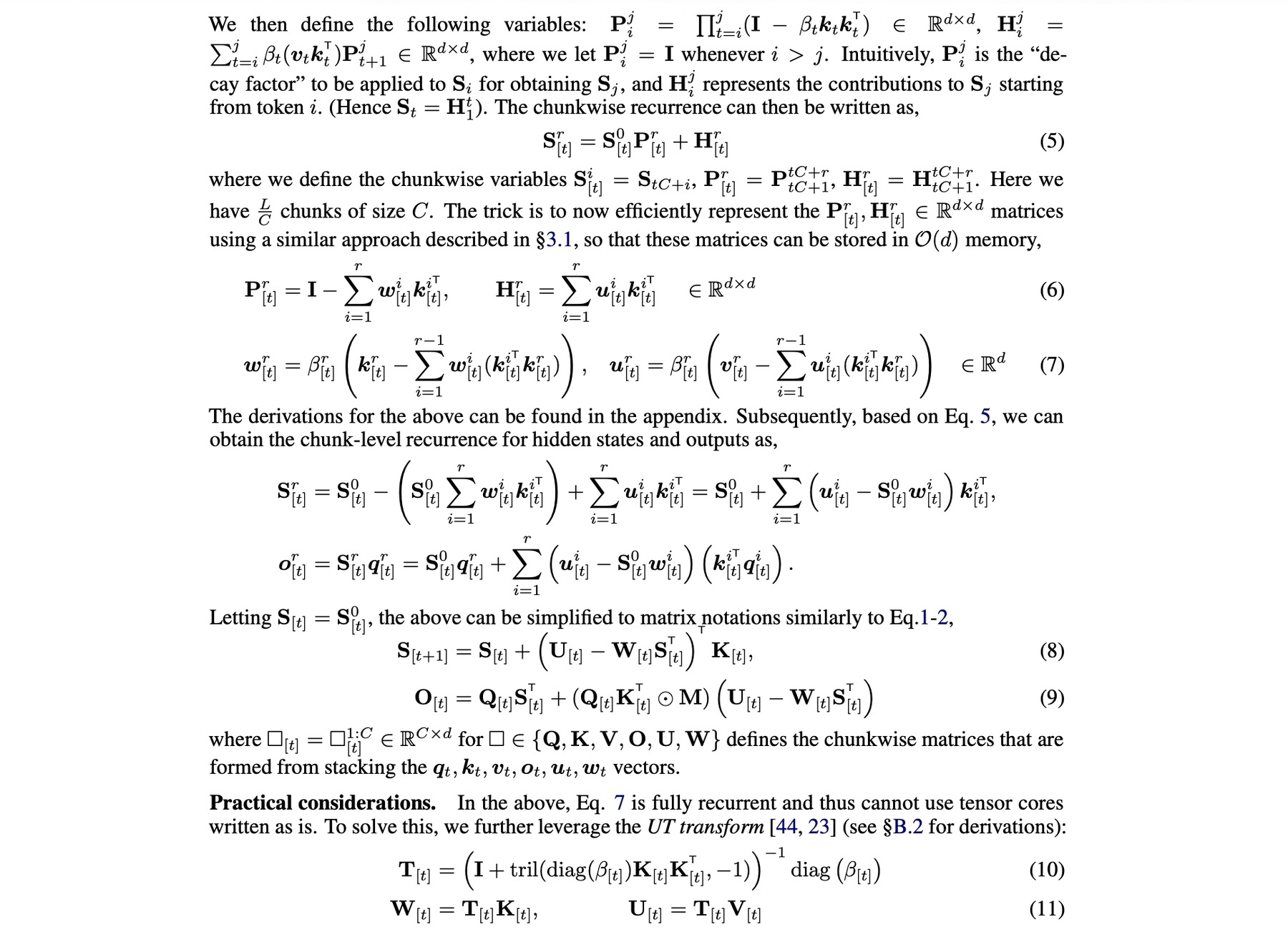
Source: official example_pics/dense-equations.jpg. This input image is also the shared cover for all three editions.
What can you use it for?
Start with the output you need:
| Your task | Input | Intended output |
|---|---|---|
| Document parsing | A paper, scan or photographed page | Content in reading order, including text, tables and formulas |
| Key information extraction (KIE) | A document image and requested fields | Structured fields, such as a JSON object matching your schema |
| OCR-focused visual question answering (VQA) | An image and a question about it | An answer based on the document |
The model card describes support for scanned, warped, photographed and skewed documents. It also reports results for historical handwriting and calligraphy. Whole-page parsing is the default in its Transformers example; the Ollama guide additionally offers region mode, which requires extra layout dependencies.
How a Qwen base becomes an OCR specialist
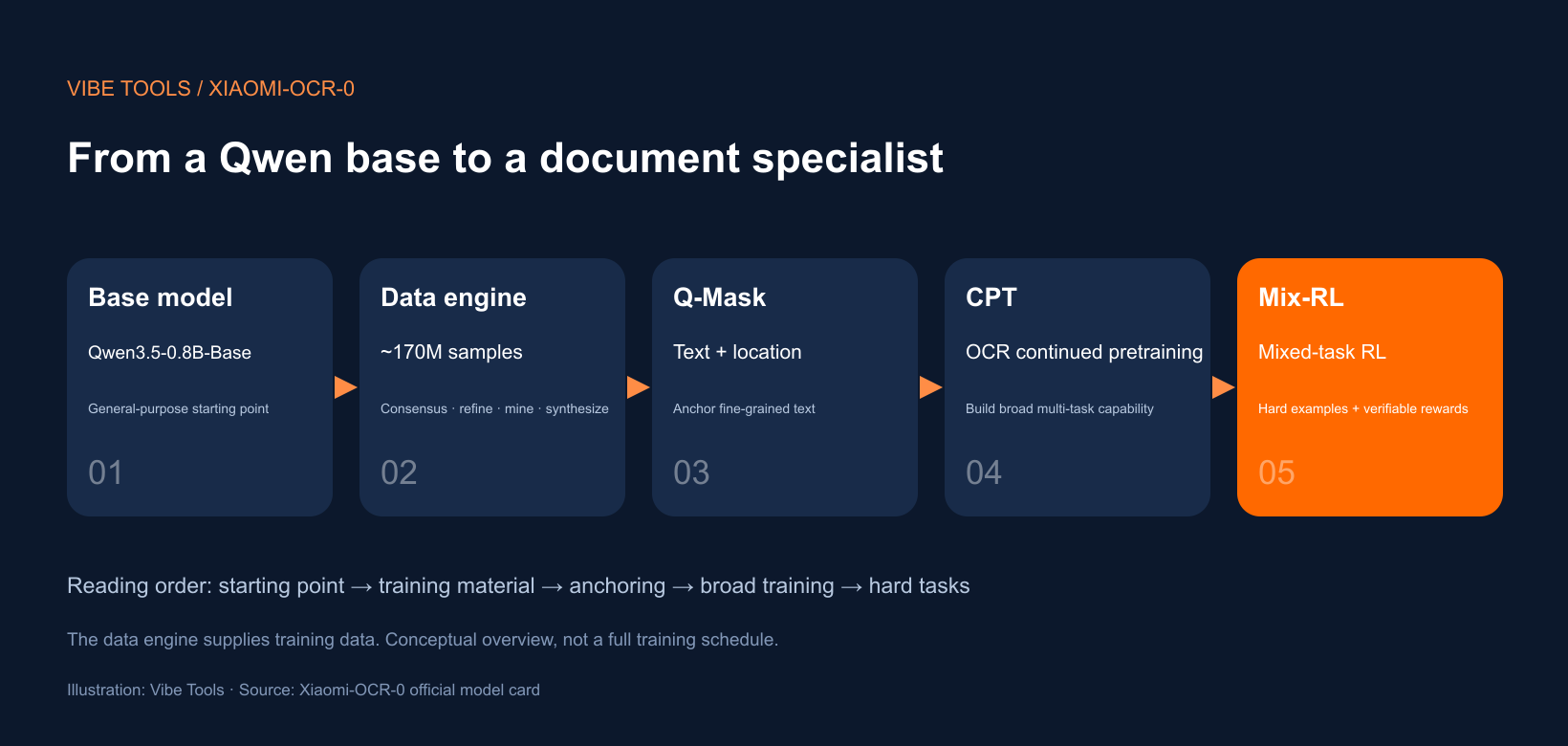
Illustration by Vibe Tools, based on the official model card. The arrows show the explanation order; the data engine supplies training material.
Start with a capable intern
The starting checkpoint is Qwen3.5-0.8B-Base. Further training adapts its existing capabilities to OCR and document understanding.
Our intern already has a general education. Now the job is to make them better at papers, forms and invoices. This analogy does not require assuming that the base model has no document skills at all: specialization improves a starting point.
Build teaching material with a data engine
The approximately 170M samples cover both parsing and OCR-focused understanding. Reliable answers matter as much as the number of documents. The data engine addresses this in four ways:
- Ask several teachers. A pool of different expert models proposes labels. Ensemble Triplet Consensus (ETC) ranks candidates by agreement across the pool, selects a three-expert consensus subset and sends uncertain cases for refinement. This is more specific than a simple majority vote.
- Turn the answer back into an image. When experts disagree, candidate labels are rendered and compared with the original region. A broken table structure or misplaced formula symbol is easier to spot this way.
- Choose useful exercises. Sample selection combines expert agreement, model self-consistency, semantic clustering and verified failure patterns.
- Write extra exercises where needed. Coverage-driven synthesis fills gaps in structures, styles, glyphs and domains. Failure-driven synthesis targets mistakes that recur during training.
The listed experts are PaddleOCR-VL-1.6, MinerU2.5-Pro, GLM-OCR, dots.mocr, HunyuanOCR-1.5, TeleOCR, OvisOCR2 and Qianfan-OCR. In the intern analogy, teachers help prepare the answer book, review disputed answers and add practice for recurring errors.
Q-Mask teaches “what text, where?”
Q-Mask text anchoring aligns fine-grained text with its location. Copying an amount is one skill; finding that amount in the original page is another. The latter matters when extracting a field or distinguishing table cells.
This explains the goal of anchoring. The technical report is the place for the underlying mechanism.
CPT gives broad document practice
OCR-focused continued pretraining (CPT) builds broad, multi-task capability. Imagine rotating the intern through text, tables, formulas and document questions so that the basic skills develop together.
Mix-RL adds harder exercises and checkable feedback
Mixed-task reinforcement learning (Mix-RL) uses verifiable rewards on difficult examples. It is the assessment stage in our analogy: harder tasks, with feedback that can be checked. CPT builds the foundation; Mix-RL improves performance on challenging work.
What the reported scores tell you
The following scores and ranking claims come from the official model card.
| Benchmark | Xiaomi-OCR-0 | Task |
|---|---|---|
| OmniDocBench v1.6 | 96.83, #2 | Document parsing |
| Wild-OmniDocBench | 87.94, #2 | Document parsing in challenging settings |
| Real5-OmniDocBench | 95.24, #1 | Document parsing |
| UniMER-Test | 97.84 | Formula recognition |
| PubTabNet | 92.27 | Table recognition |
| Chronicles-OCR Mature Scripts | 73 | Historical handwriting and calligraphy; Seed 2.0 Pro scores 72 |
| Mean of five OCR-VQA benchmarks | 83.2 | DocVQA, InfoVQA, ChartQA, OCRBench and TextVQA |
Parsing against other compact models
| Model | Size | OmniDocBench v1.6 ↑ | Real5 ↑ | Wild ↑ |
|---|---|---|---|---|
| Xiaomi-OCR-0 | 0.8B | 96.83 | 95.24 | 87.94 |
| TeleOCR | 1.2B | 96.87 | — | 88.53 |
| OvisOCR2 | 0.8B | 96.58 | 92.29 | 87.91 |
| PaddleOCR-VL-1.6 | 0.9B | 96.33 | 93.19 | 87.36 |
| MinerU2.5-Pro | 1.2B | 95.75 | 88.94 | 87.33 |
| GLM-OCR | 0.9B | 95.22 | 90.32 | 85.08 |
Higher is better. A dash means the source did not report a value; bold identifies Xiaomi-OCR-0.
Understanding against Qwen models
| Model | DocVQA | InfoVQA | ChartQA | OCRBench | TextVQA | Mean |
|---|---|---|---|---|---|---|
| Qwen3.5-0.8B | 88.5 | 60.3 | 69.5 | 77.9 | 68.3 | 72.9 |
| Qwen3.5-2B | 92.4 | 72.4 | 77.0 | 85.9 | 76.9 | 80.9 |
| Xiaomi-OCR-0 | 93.1 | 75.1 | 84.6 | 84.6 | 78.6 | 83.2 |
The mean is the arithmetic average on a 0–100 scale. Xiaomi-OCR-0 beats Qwen3.5-2B on that mean, while Qwen3.5-2B retains the higher OCRBench score, 85.9 versus 84.6.
What changed during training?
| Training result | Parsing Overall: OmniDocBench v1.6 | Understanding Overall: five-task VQA mean |
|---|---|---|
| 0.8B CPT | 96.4739 | 78.1 |
| 0.8B MOPD | 96.7417 | 82.7 |
| 0.8B Mix-RL | 96.8277 | 83.2 |
| 4B task-specific teachers | 96.9745 | 88.1 |
CPT to Mix-RL raises parsing from 96.4739 to 96.8277 and understanding from 78.1 to 83.2. MOPD, the comparison approach with one parsing teacher and one understanding teacher, converges quickly. Longer-trained Mix-RL reaches a higher peak.
The 4B teachers lead the 0.8B student by about 4.9 points on understanding and 0.15 on parsing. Each teacher specializes in one task, while the student trains on both; within each task, they use the same amount of task data. Size is therefore not the only difference in that comparison.
Another useful finding concerns timing. Adding understanding data changes parsing by −0.330, +0.639 and +0.0749 at stages using 9%, 29% and 50% of the parsing data respectively. Each change uses its own stage's parsing baseline. In these experiments, understanding data helps once the parsing foundation is strong.
Try one image locally
Pick a page you can check by hand. Compare the transcription, formula structure and reading order before moving to a batch. Official examples include the dense mathematical page above and this photographed handwritten derivation.
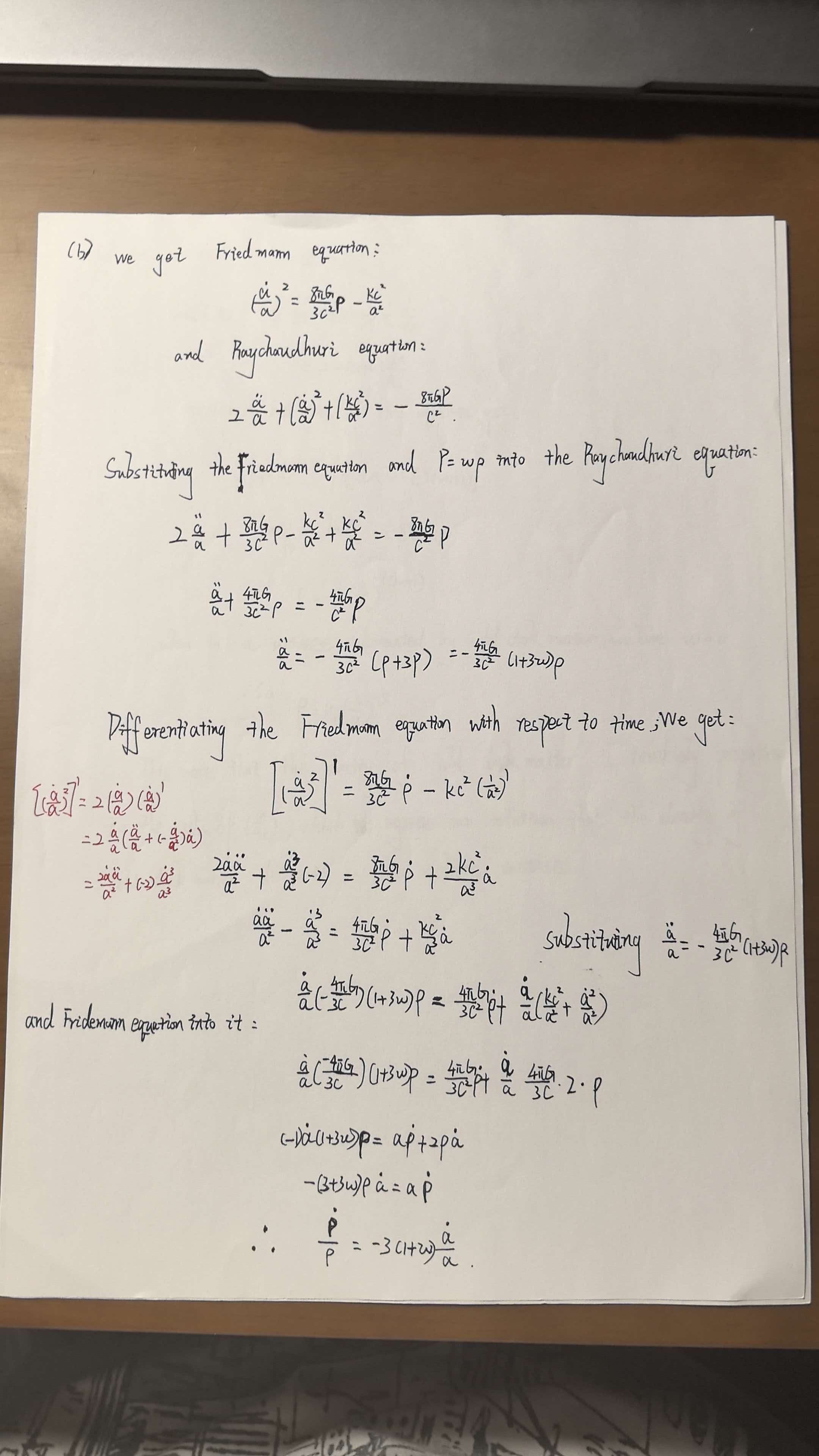
Source: official example_pics/handwrite-formula.jpg. This is an input example; the model card also shows parsed output.
Option A: Ollama with the repository's MCP service or Demo
The model card labels Ollama support experimental. With Ollama installed and running, download the community BF16 package, approximately 1.8 GB, including the text model and vision projector:
ollama pull longwayxu/xiaomi-ocr-0:bf16
Then follow the repository's Ollama guide for the MCP service or browser Demo. These integrations apply the required image preprocessing, non-thinking prompt and decoding settings automatically. Pulling the model alone does not configure those steps. The guide also covers PDF parsing, KIE and VQA; region mode needs additional layout dependencies.
Option B: Transformers for whole-page parsing
Use the version combination given in the model card:
uv venv --python 3.13
source .venv/bin/activate   # Windows: .venv\Scripts\activate
uv pip install "transformers==5.17.0" "torch==2.14.0" "torchvision==0.29.0" pillow
Save the following as ocr_demo.py, then run python ocr_demo.py. It uses the official repository ID linked in this article and downloads an official example. Replace IMAGE with a local path to test your own page.
import torch
from huggingface_hub import hf_hub_download
from transformers import AutoModelForImageTextToText, AutoProcessor

MODEL = "xiaomi-research/Xiaomi-OCR-0"
# Choose "qianziwen.jpeg" or "dense-equations.jpg".
IMAGE = hf_hub_download(
    repo_id=MODEL,
    filename="example_pics/qianziwen.jpeg",
)
PROMPT = (
    "Extract all information from the main body of the document image and represent it "
    "in markdown format, ignoring headers and footers. Tables should be expressed in OTSL "
    "format, formulas in the document should be represented using LATEX format, and the "
    "parsing should be organized according to the reading order."
)

device = (
    "cuda" if torch.cuda.is_available()
    else "mps" if torch.backends.mps.is_available()
    else "cpu"
)
dtype = torch.float32 if device == "cpu" else torch.float16
processor = AutoProcessor.from_pretrained(MODEL)
model = AutoModelForImageTextToText.from_pretrained(
    MODEL, dtype=dtype,
).to(device).eval()

messages = [{
    "role": "user",
    "content": [
        {"type": "image", "url": IMAGE},
        {"type": "text", "text": PROMPT},
    ],
}]
inputs = processor.apply_chat_template(
    messages, tokenize=True, add_generation_prompt=True,
    return_dict=True, return_tensors="pt",
)
inputs = inputs.to(device)

with torch.inference_mode():
    output = model.generate(**inputs, max_new_tokens=4096, do_sample=False)

new_tokens = output[:, inputs["input_ids"].shape[1]:]
print(processor.batch_decode(new_tokens, skip_special_tokens=True)[0])
The prompt asks for reading-order output, LaTeX formulas and OTSL tables. OTSL represents table structure; it is not an ordinary Markdown table. If a long page's output stops early, check the example's max_new_tokens=4096 limit.
Check these details before switching packages
- Vision projector: image inference needs one. The prithivMLmods GGUF package requires
Xiaomi-OCR-0.mmproj-bf16.gguf; xzl01's package uses an F16 projector. - Inference settings: the Ollama MCP service and Demo apply the documented settings; downloading weights alone does not.
- Conversion results: the official team has not evaluated the listed community GGUF conversions. Their accuracy is not established by the original checkpoint's scores. Consult the NInfer BF16 package page for its contributor-reported runtime and output comparisons.
For document conversion, begin with whole-page parsing. For field extraction, move on to KIE with a JSON schema once you understand the output from a single page.
Official references
- Xiaomi-OCR-0 model card: training recipe, benchmarks, examples and Apache 2.0 license.
- GitHub repository: project documentation.
- Ollama guide: MCP, Demo and region-mode setup.
- Technical report: data engine and training experiments.
Latest from the blog
New research, comparisons, and workflow tips from the Vibe Coding Tools team.
Learn how DeepSeek Super Agent routes work to Workers and subagents, who the research prototype suits, and how to start with one small task in a test repository.
Can you use Dessa yet? Listen to Block’s official demos and check public access, downloads, API status, local hardware and four potential use cases.
A recorded Muse signup through Airtap, covering email codes, birthday confirmation, Meta account creation, and the limits of the invite-code and chat checks.