
How to Find Real Search Demand from Paid Acquisition Signals
How to Find Real Search Demand from Paid Acquisition Signals
A company spending money on acquisition is a useful lead. It is not proof that the company bids on the keyword you have in mind.
That distinction turns a loose competitor-research exercise into a reproducible demand-discovery process: find products with paid activity, locate an exact non-brand query in a keyword data source, interpret the job on the official site, then test the market and the current search results.
The deliverable is a decision card, not a list of ideas
At the end of one research pass, another person should be able to answer:
- Which product showed a paid-acquisition signal?
- Where did the exact keyword appear?
- Was it a paid keyword, organic keyword, or related query?
- Is it a brand term or a user job?
- What input and output does the user expect?
- What does the evidence say about scale and momentum?
- Is there a credible gap in the live SERP?
- Should the team continue, watch, or stop?
If the exact-keyword source is missing, the work is not finished. A plausible phrase is still a hypothesis.
A four-stage evidence ladder
Paid traffic signal
    proves: a product is worth investigating
        ↓
Observed exact keyword
    proves: a data source associated the query with the product or market
        ↓
Official product page
    proves: the product actually serves the interpreted job
        ↓
Trends, volume, and SERP
    test: whether the market is large, durable, and enterable
Evidence from a later stage cannot repair a missing earlier stage. A strong Trends curve does not prove that a competitor bought the term. A perfect landing page does not prove that users phrase the task the way you do.
1. Build a small lead queue from paid-traffic sources
For web and AI products, Toolify's paid-source ranking and AiTing's paid-referrals ranking can provide starting points. Their labels and metrics can change, so save the page, visible channel name, market, and observation date.
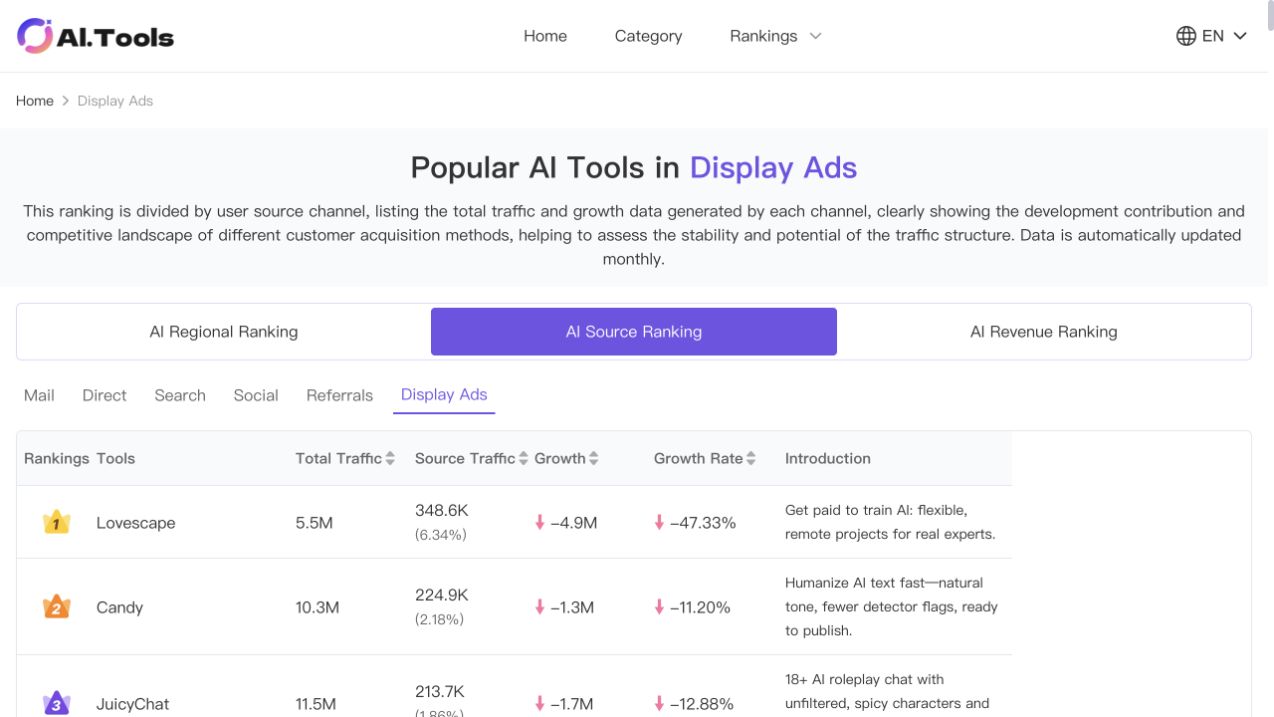
Capture only enough data to prioritize the next click:
| Field | Why it matters |
|---|---|
| Total traffic | Separates established products from tiny samples |
| Paid-channel traffic and share | Shows whether paid acquisition is material |
| Absolute and percentage growth | Distinguishes growth from a static base |
| Product URL and date | Makes the observation reproducible |
Rules such as 100K+ total visits, 5K+ paid referrals, 1%+ channel share, or 20%+ growth are reasonable queue filters, not universal thresholds. Small denominators create dramatic growth rates, and third-party traffic figures are estimates.
Exclude opportunities you cannot responsibly ship: illegal or infringing products, gambling, high-risk YMYL, businesses dependent on inaccessible private data, or workflows whose core economics cannot work for you.
2. Move from a lead page to an actual keyword report
A referral or display-ad ranking rarely proves a search keyword. Open a report that exposes exact terms, such as:
- Similarweb Paid Search, where available in your plan;
- Semrush Advertising Research Positions or Ads History;
- Ahrefs paid or organic keyword reports;
- related queries that Google Trends actually displays.
Semrush describes its Positions report as a view of keywords triggering a competitor's paid ads. Its Ads History report presents historical ad observations by keyword. Those are keyword sources; a home-page headline is not.
Save each observation before interpreting it:
exact_keyword:
source_product:
source_url:
source_type: paid_keyword | organic_keyword | related_query
market:
observed_at:
landing_page:
Keep the spelling exactly as shown. Do not translate it, singularize it, or improve it. If no non-brand term appears, report “paid product found; keyword not found” and stop that branch.
3. Use the official site to decode the job
Classify the saved terms:
- Brand: product, company, or navigational queries.
- Demand: a task that multiple products could satisfy.
- Irrelevant: intent that does not match the core experience.
For a demand term, inspect the relevant official page and write one job statement:
The user supplies [input].
The product returns [output].
This helps [target user] complete [job].
Stitch, for example, presents a workflow that turns ideas into UI designs for mobile and web applications.

That supports a product job around idea-to-UI generation. It does not prove that Stitch bids on text to ui. Until the phrase appears in a real query source, label it honestly:
keyword: text to ui
source: inferred_from_feature
status: hypothesis
next_check: paid keyword report or related queries
4. Use Google Trends for direction, not absolute volume
Once an exact term has a source, inspect several windows:
- five years for the baseline and re-emergence;
- twelve months for seasonality;
- ninety and thirty days for persistence;
- seven days for a temporary spike or rapid collapse.
Choose deliberately between a Search term and a Topic. Google's documentation says a search term follows the entered wording, while a topic groups related expressions and languages. Record which one you used.
Trends values are normalized and scaled from 0 to 100. They are not monthly search counts. Keep location, period, category, and search type identical when comparing terms. Run a small query alone before placing it next to a much larger benchmark.
Calibrate against a benchmark you actually know
Suppose your own validated US benchmark is:
Narrate monthly search benchmark = 5,000
A relative estimate is:
candidate monthly estimate
= 5,000 × candidate mean Trends value ÷ benchmark mean Trends value
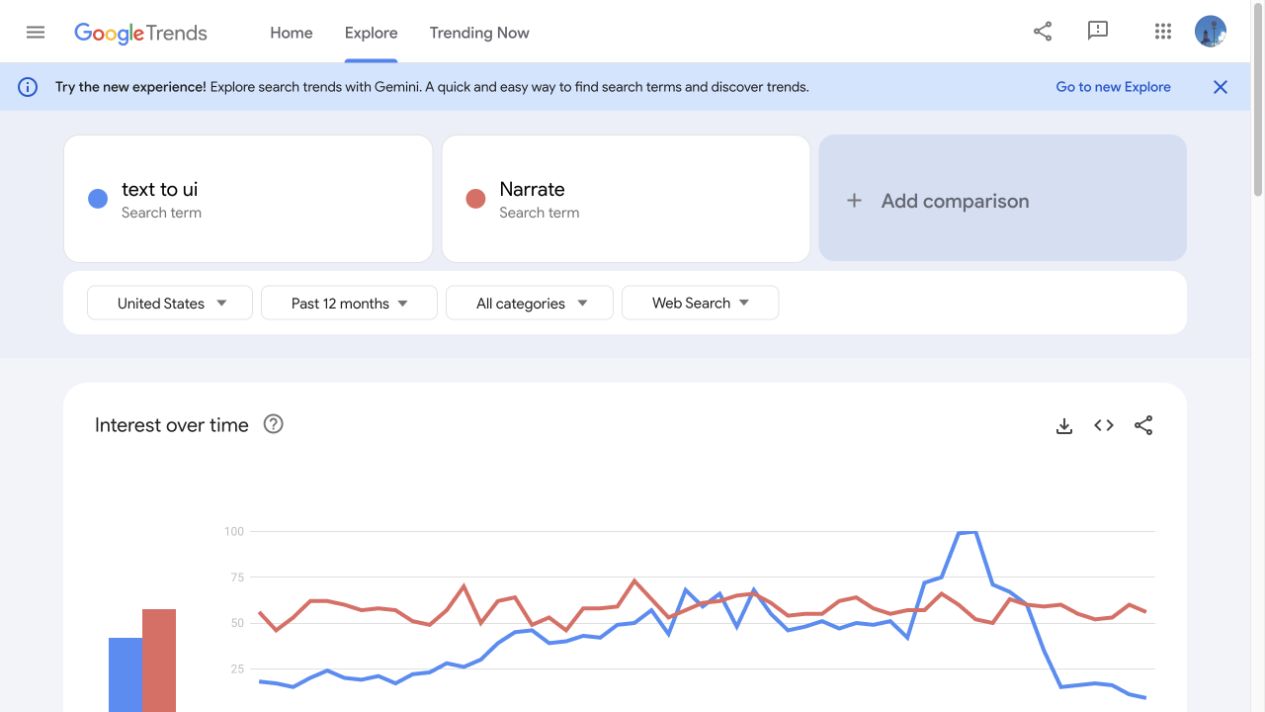
This is an estimate, not a Google-provided search volume. Calculate multiple windows and report a range when they disagree. If 5,000 is only a Search Console click count, call the output a click-equivalent estimate unless rank and CTR have been calibrated well enough to model total demand.
5. Read the SERP as a map of existing products
Search the exact term and inspect the first ten results manually:
- Do they solve the same job?
- Are they product home pages, feature pages, tutorials, templates, videos, or app stores?
- Do official sites and large brands occupy every useful position?
- Are small sites ranking with weak pages?
- Is a missing input format, output quality, price, speed, or workflow visible?
- Do paid and organic results promise the same outcome?
An exact-title filter or intitle:"exact phrase" can help discover title-focused pages, but use it qualitatively. Google warns that search operators are constrained by indexing and retrieval. A fluctuating result count is not a stable keyword-difficulty score or a market-size measurement.
6. Apply stop rules in order
Paid acquisition signal found?        no → drop the lead
Observed non-brand keyword found?      no → watch; find the source
Product job matches the query?         no → drop the keyword
Demand is meaningful and persistent?   no → drop or monitor
SERP has a deliverable gap?             no → stop before building
All gates pass?                        yes → continue validation
The labels mean:
- Continue: source, intent, scale, and SERP all justify another research pass.
- Watch: a real product signal exists, but one of the proof gates is still open.
- Drop: the query is mismatched, demand is too weak, supply is locked up, or the product cannot be delivered responsibly.
Worked example: Thea and pdf to flashcards
Assume the research shows:
- Thea has a paid-acquisition signal.
- The visible keyword data is mostly branded, such as
theaandthea study. - The official product turns study material into flashcards.
pdf to flashcardswas inferred from the feature and was not found in the saved keyword report.- Search volume and the first-page product map are incomplete.
The correct outcome is Watch, not Continue:
Proven:
Thea is worth researching and serves a study-material-to-flashcards job.

Not proven:
Thea buys "pdf to flashcards";
the query has a calibrated monthly volume;
the current SERP contains a gap a new product can fill.

Smallest next action:
Search Paid Search, traffic keywords, or Trends related queries
and save one observed non-brand term verbatim.
If the exact phrase later appears, validate its source, matching landing page, market-specific trend, and live SERP. Positive evidence from those later checks still cannot be backdated into the earlier paid-keyword claim.
Reusable research card
product:
paid_signal_source:
paid_signal_observed_at:

exact_keyword:
keyword_source_url:
keyword_source_type:
keyword_observed_at:
brand_or_demand:

input:
output:
target_user:
job_to_be_done:

trend_windows:
volume_method:
volume_range:
serp_shape:
entry_gap:

decision: continue | watch | drop
reason:
next_smallest_action:
The card is useful because every conclusion points back to an observation. It prevents a memorable product feature from quietly becoming a fictional keyword.
References
Latest from the blog
New research, comparisons, and workflow tips from the Vibe Coding Tools team.
A recorded Muse signup through Airtap, covering email codes, birthday confirmation, Meta account creation, and the limits of the invite-code and chat checks.
A practical look at local LLMs and agent workflows on a 32GB Apple Silicon Mac mini, including Qwen3.6-35B-A3B, MLX, and tool-calling limits.
A practical review of Jev's typed decisions, state handling, current AI Gateway availability, and independent open source alternatives.