
DeepSeek Superagent Routing: A Real Task from Request to Delivery
A request arrives, an agent accepts it, a separate Worker creates a file, and the result returns to the place where the request started. That is the complete loop we observed in this DeepSeek Superagent walkthrough.
The interesting part is how work stays connected. If you add “one more example,” should the existing Worker continue? If you ask for a different feature in the same discussion, should that become a new task?
Superagent organizes requests into tickets and routes messages to the work they belong to. A Router handles intake and routing; a Worker carries out a ticket.
This article covers the public dsh-superagent-prototype, which runs on DeepSeek Harness, or dsh. DeepSeek describes it as a research prototype, with differences from its internal implementation and design proposal. The behavior discussed here is tied to the inspected source revision. Official project
Follow one task through five screenshots
For this demonstration, we added a local request page and a Source adapter. The page embeds the actual dsh Superagent panel below the request form.
This local intake is our teaching extension. It is not a built-in upstream screen. We also adapted startup checks and delivery instructions so the task could finish locally without a repository. The Router model and Worker tools ran for real.
The screenshots show a Chinese interface. The important labels are explained beside each step.
1. Submit a small, verifiable request
Our request asked the Worker to create hello.txt in its ticket directory, write the exact sentence below, read the file back, and return its path and contents:
你好,我是 Worker,已收到任务。
That sentence means “Hello, I’m the Worker. I received the task.” We kept the Chinese text unchanged so the screenshots and file verification match. The request also excluded external websites, subagents, and repository operations.
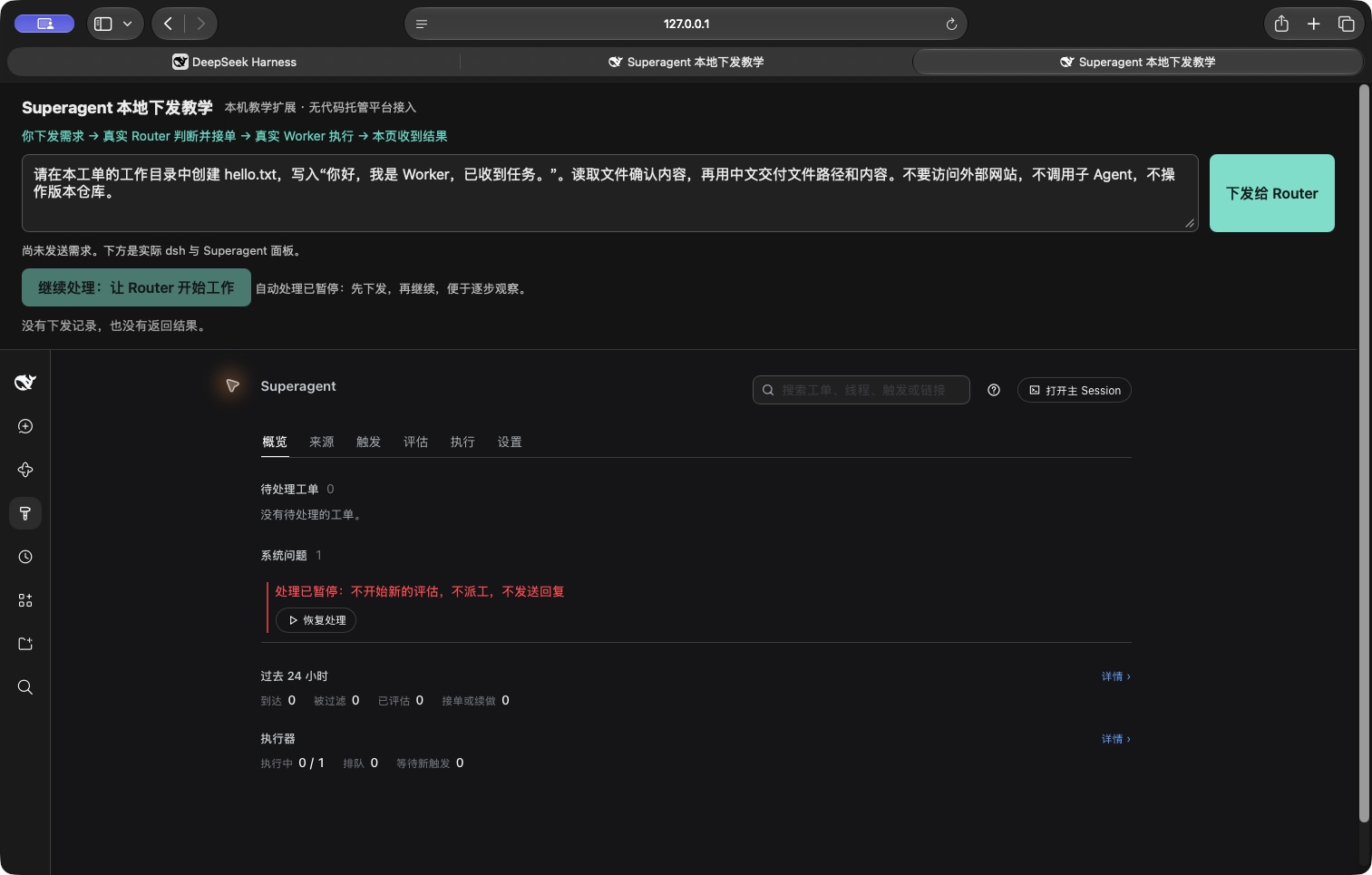
The input is ready, while arrival, assessment, and acceptance counters are still zero.
2. Check that the request arrived
We clicked the button labeled 下发给 Router (“Send to Router”). The page returned stored, and the panel’s 触发 (“Triggers”) tab showed the original request as 已排队,等待评估 (“Queued, awaiting assessment”).
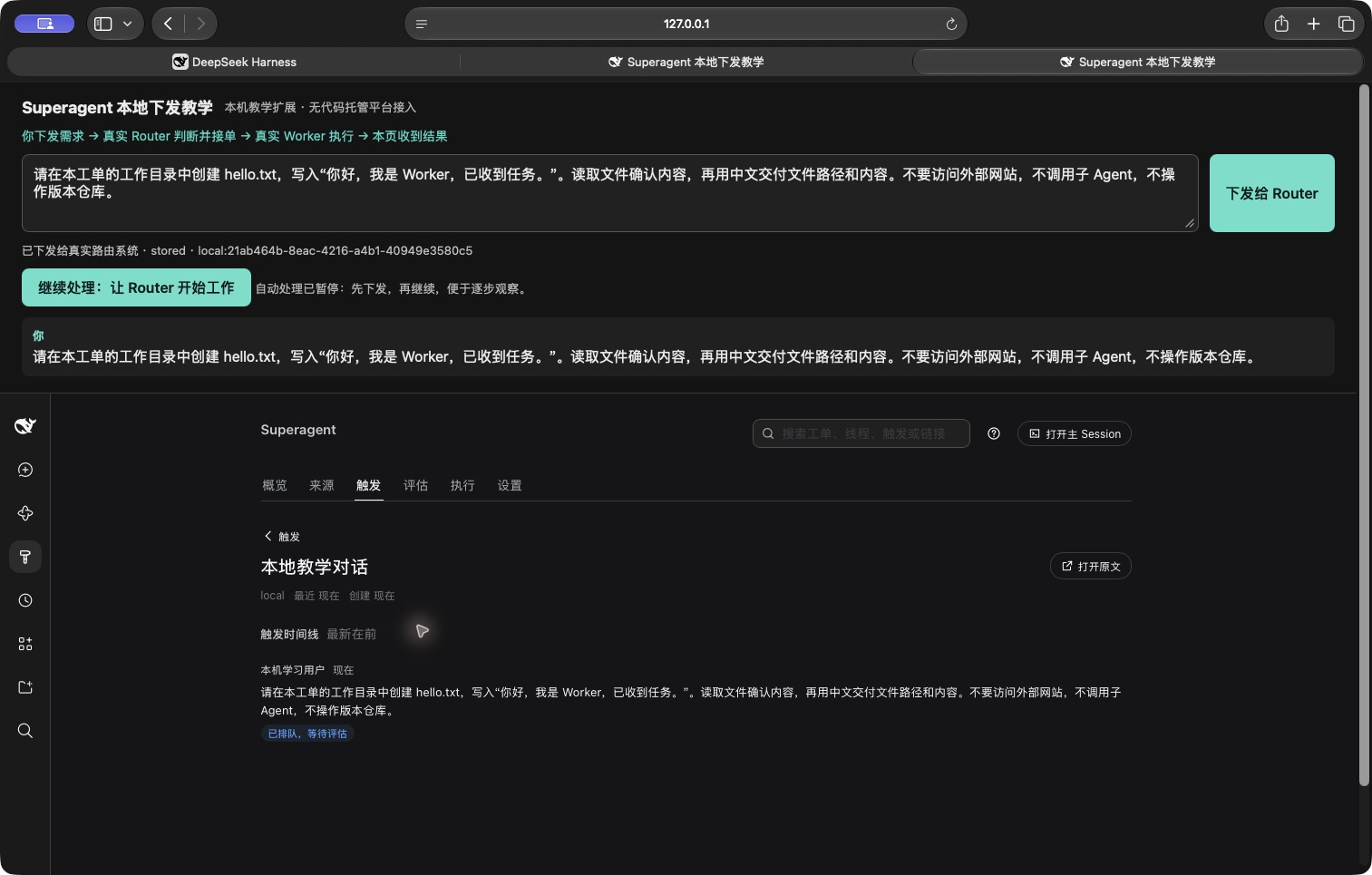
The system has received the message. The Router has not assessed it yet.
A Trigger is simply a recorded incoming event. We had paused automatic processing beforehand to make this boundary visible: receiving a request and deciding to execute it are separate steps.
3. Let the Router accept the work
After we resumed processing, the 评估 (“Assessment”) tab showed an acceptance decision. Its reason was an explicit request from an allowed sender.
The system created a ticket for writing the specified content to hello.txt. A ticket keeps the original request, scope, status, and execution session together.
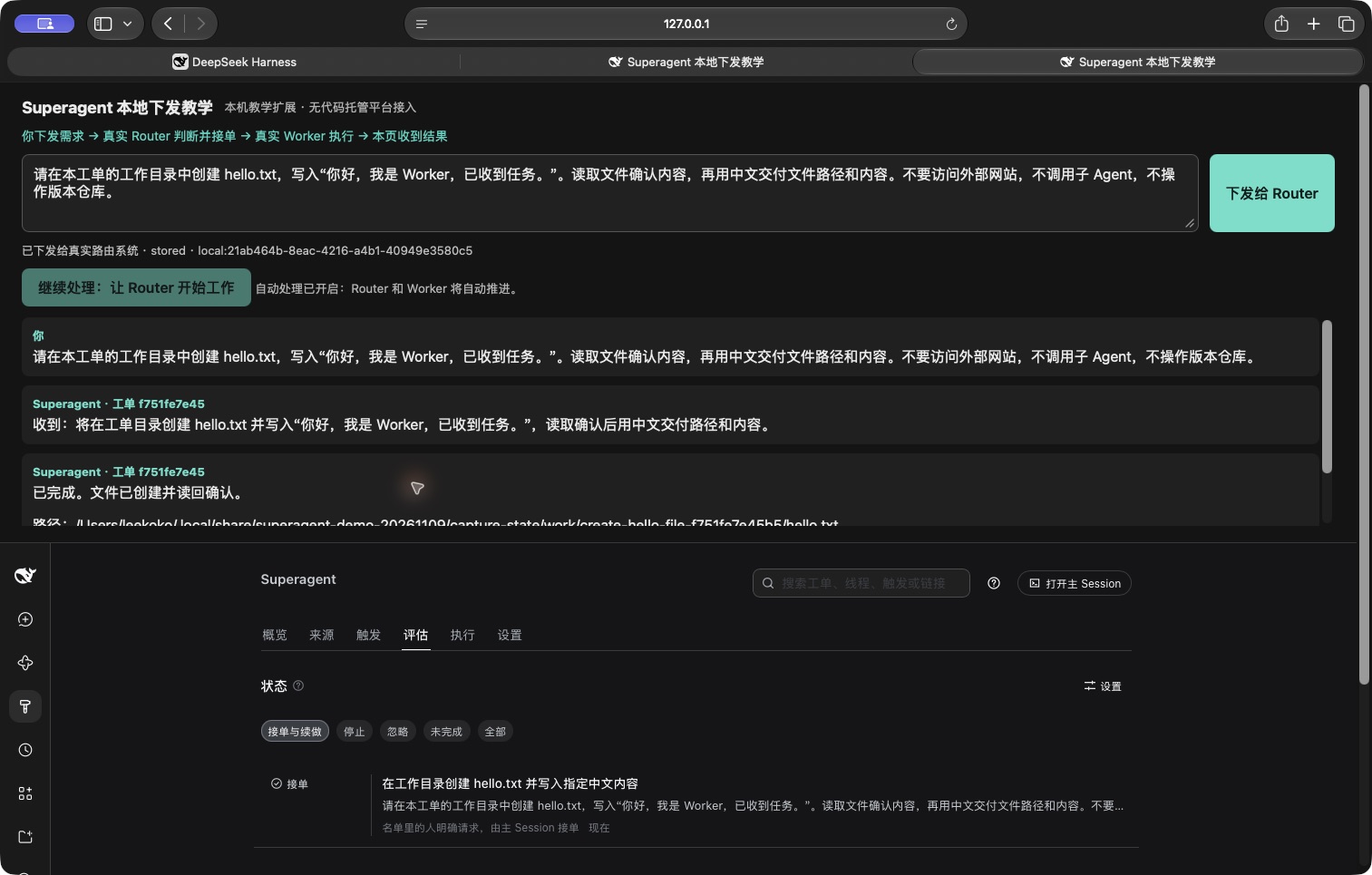
The ticket ID begins with f751fe7e45. The Worker and returned messages belong to this same ticket.
4. Inspect what the Worker actually did
From the ticket, we opened its Session. The tool record showed a command that checked the working directory and wrote the file, a read call that verified the contents, and a completion report.
The screenshot below opens the read tool’s result. The first content line is the text read from the file.
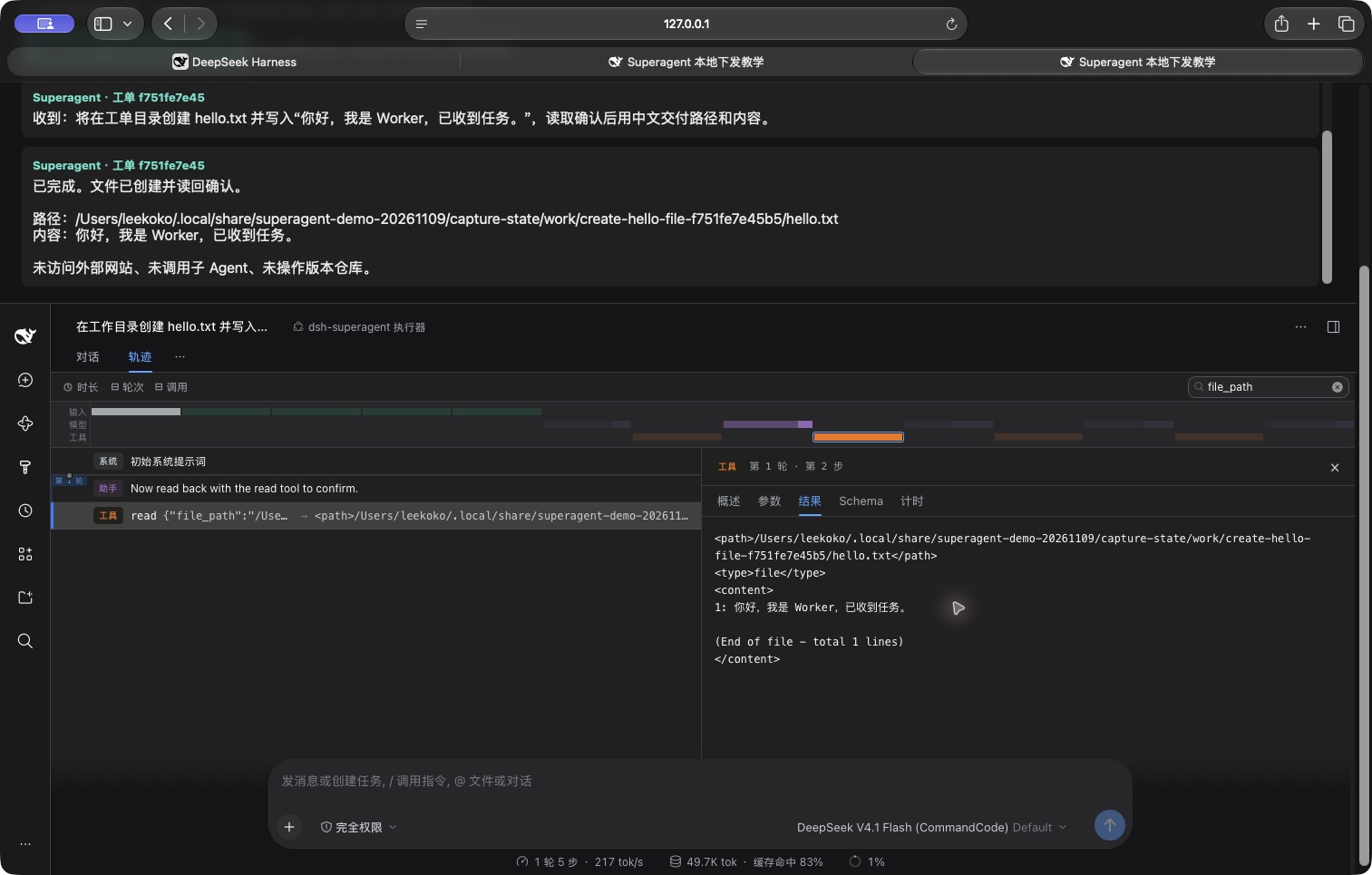
The right-hand Result pane shows the file contents. The local intake’s completion reply is also visible above it.
This is the execution boundary: the Router routed the request; the Worker used tools to fulfill it.
5. Verify the returned result
The local page received an acknowledgement followed by a completion message containing the file path and contents.
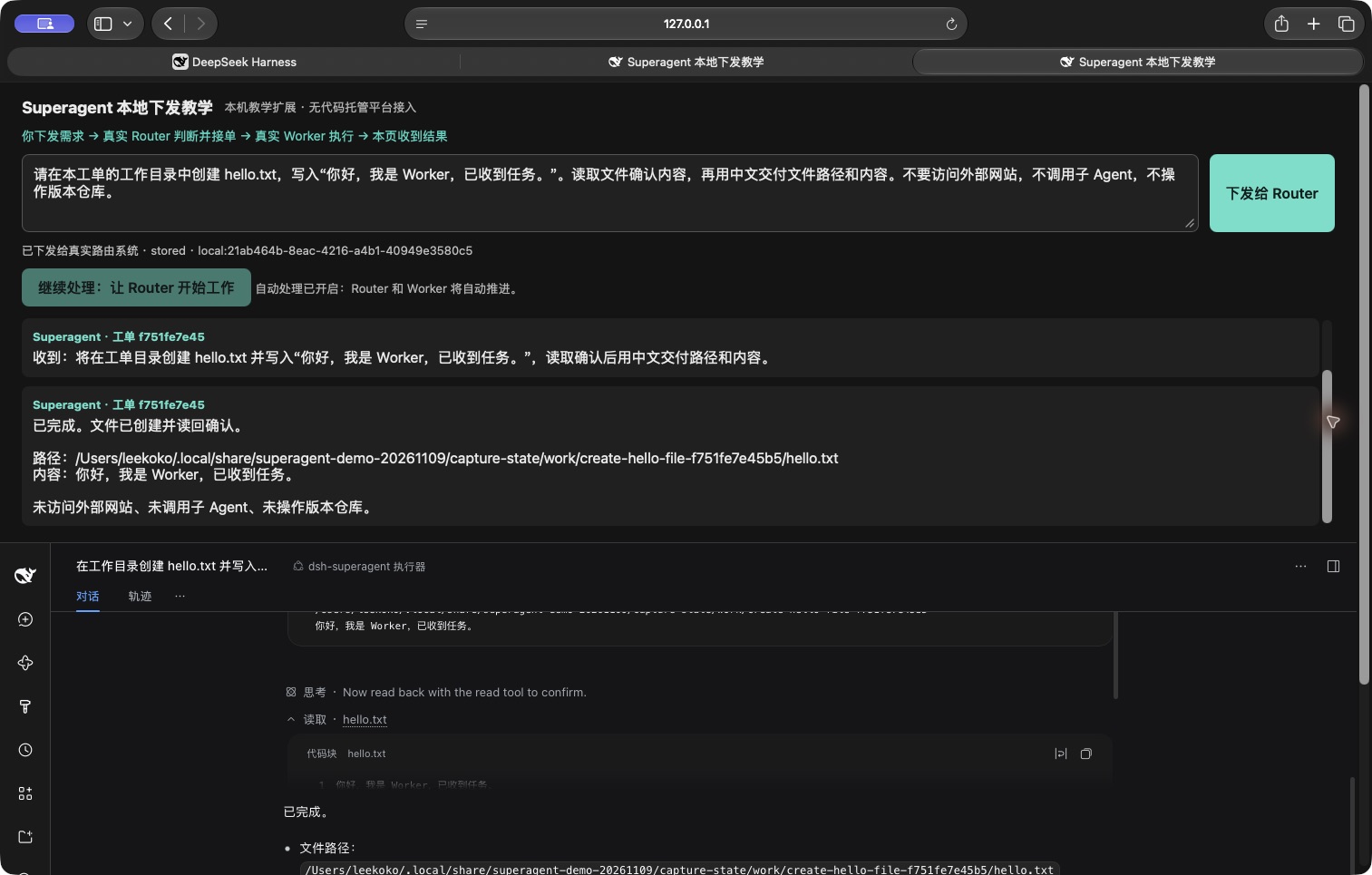
The result returns to the same page where the request was submitted.
We separately checked the file on disk. It existed, matched the requested sentence, and contained 43 UTF-8 bytes. The Worker session displayed 11 seconds for this run. This tiny task is one observation, not a benchmark for other workloads.
The demonstrated loop was:
Local request page
        ↓
Incoming message stored
        ↓
Router accepts a ticket
        ↓
A Worker session starts for that ticket
        ↓
Worker writes and reads the file
        ↓
Result returns to the local page
No GitHub or GitLab integration, pull request, or merge request was involved. The delivered artifact was the local file.
What the Router and Worker each own
Think of an intake desk and the people doing the work. The desk keeps new requests moving while the execution takes place elsewhere.
| Component | Responsibility | In this demonstration |
|---|---|---|
| Router | Accept new work, attach a message to existing work, stop, or ignore | Accepted the file task |
| Worker | Investigate, act through tools, verify, and report | Created and read hello.txt |
| Runtime | Store records, deliver messages, and manage execution slots | Created the ticket/session and returned the result |
The program maintains confirmed relationships and state; a model does not have to rediscover them on every message. Separate accepted tasks can have separate Workers. Available slots determine whether they run concurrently or queue. Workers may also use subagents within their tasks; this demonstration did not. Execution and concurrency
When an existing session is reused
A Worker session is created for a ticket and persists. Continuing that ticket can reuse the session; accepting a new ticket creates its own session.
| Later message | Intended handling |
|---|---|
| “Add an explanation to the file you just created.” | Continue the existing Worker if it fits the ticket’s scope |
| “Also build a weather page.” | Assess it as separate work |
| “Thanks, received.” | May require no further work |
| “Stop this task.” | Stop the work under the human stop rules |
These are explanatory examples. The real model run above completed only the initial file ticket.
Follow-up messages in a subscribed discussion can reach the existing Worker directly. A normally completed ticket can also resume when the relevant rules permit it. The Worker decides whether the follow-up belongs to its ticket; an out-of-scope request is handed back for fresh routing. A ticket explicitly stopped by a person does not automatically resume from a later message. Follow-up rules
Consequently, a new request in the same chat may first reach the old Worker and then return to the Router. Sharing a discussion does not make two requests the same job.
The implementation reflects this: the session ID is worker-<ticketId>. Startup resolves an existing session first and creates one only when none exists. Session creation, ticket-to-session mapping
Ticket routing and persistent specialist Bots
A persistent agent team starts with roles such as frontend developer, researcher, or writer, then keeps using those agents across different tasks.
The public Superagent prototype primarily organizes work around tickets. Its Router asks which piece of work a message belongs to. A previous Worker does not automatically become the preferred “file expert” because it handled a similar request earlier.
The four routing actions are accept, attach, stop, and ignore. Attaching requires a clear connection to an existing ticket; a similar subject alone is insufficient. Routing instructions
Grok Bot places persistent Bots at the center of its product. Each can retain rules, preferences, and a work log, and Bots can hand work to one another. That supports ongoing roles across tasks. It does not establish that every handoff automatically selects the best possible specialist. Bot memory, Bot handoffs
| Focus | Public Superagent prototype | Grok Bot |
|---|---|---|
| Main organizing unit | Ticket and its execution session | Persistent Bot |
| Context kept over time | Ticket history, files, and work records | Bot rules, preferences, and work memory |
| Continuing work | Resume a ticket or accept a new one | Return to an existing Bot or hand work off |
References
- Official project: prototype scope.
- Execution model: Worker sessions and execution.
- Router instructions: new work and existing-ticket routing.
Latest from the blog
New research, comparisons, and workflow tips from the Vibe Coding Tools team.
Understand Xiaomi-OCR-0 with a simple training analogy: 170M samples, Q-Mask, CPT and Mix-RL. Compare official scores and try document parsing locally with Ollama or Transformers.
Learn how DeepSeek Super Agent routes work to Workers and subagents, who the research prototype suits, and how to start with one small task in a test repository.
Can you use Dessa yet? Listen to Block’s official demos and check public access, downloads, API status, local hardware and four potential use cases.